
 Home
Home Order Forms
How to Identify the Back of Your Slides
Quick Answer: Look for Dates and Numbers
The easiest way to identify the back of a slide? Look for dates or numbers. Slide backs are usually very plain—just a date stamp, processing code, or handwritten number. That's it.
The front of the slide, by contrast, displays the film brand name (Kodachrome, Ektachrome, Fujichrome, etc.) and often includes a colored border or frame design. See examples of slide fronts here.
Why Does Slide Orientation Matter?
Getting your slides oriented correctly is essential for accurate scanning. When slides are facing the wrong direction, your digital images come out backwards—mirror images of what they should be.
We need to scan your slides exactly as you viewed them. That means the side that faced toward the projector screen (the front) needs to face our scanner, and the side that faced away from the screen (the back) needs to face away from our scanner.
Don't worry if this sounds confusing—we'll explain it clearly below.
What Slide Backs Look Like
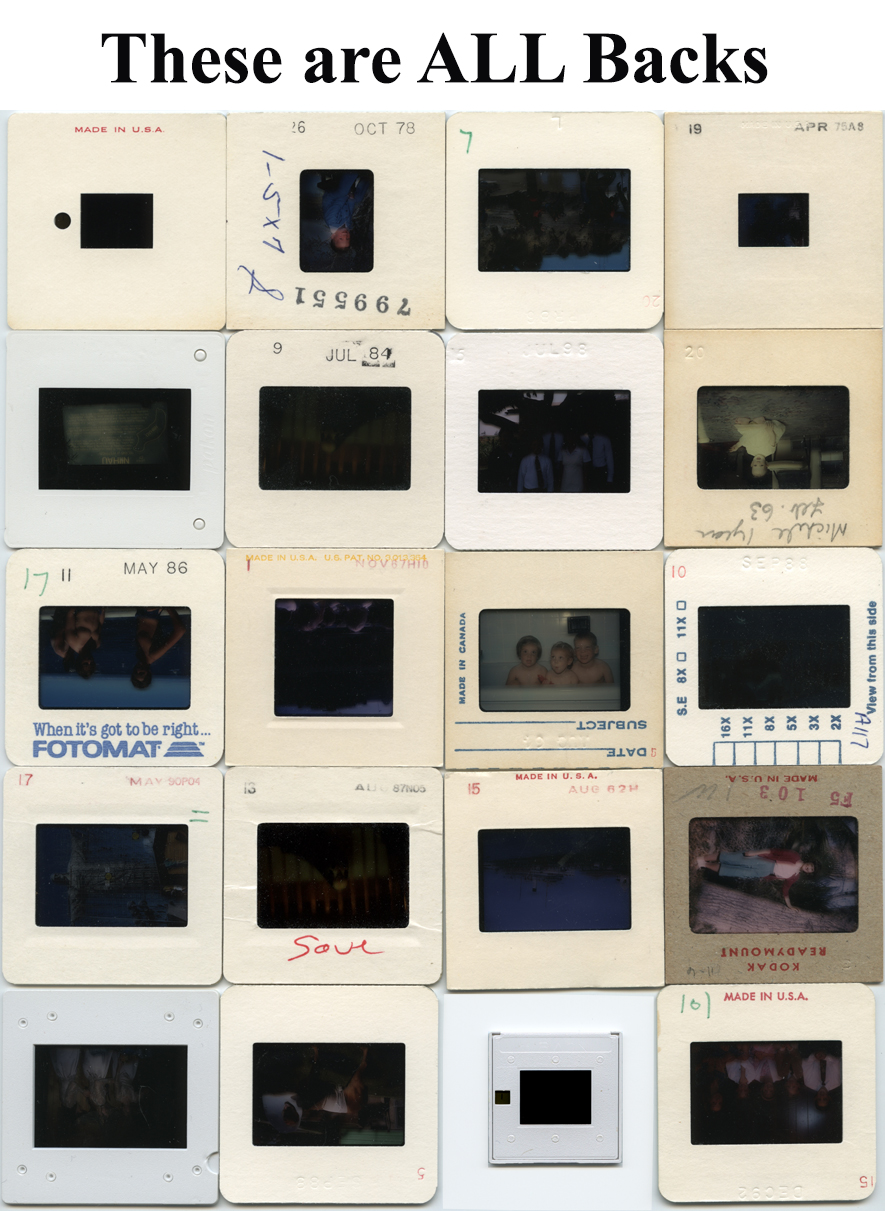
Slide backs are remarkably plain compared to fronts. Here's what you'll typically see:
Date stamps: Most processing labs stamped the month and year on the back—something like "MAR 78" or "JUL 1985."
Processing codes: Labs often added batch numbers or processing codes.
Handwritten numbers: Many people numbered their slides on the back for organization.
Handwritten descriptions: Some photographers wrote notes like "Grand Canyon" or "Sally's Birthday" on the backs.
Mostly blank space: The rest of the slide back is usually empty cardboard.
Visual Examples of Slide Backs
Here's what slide backs actually look like when you're sorting through your collection. Notice how plain they are compared to the decorated fronts:
Why People Wrote on Slide Backs
You might wonder why photographers wrote information on the backs rather than the fronts. There's a practical reason:
When loading slides into a projector, you're looking at the back. The slide sits in your hand with the back facing you as you insert it into the projector tray. This made the back the natural place to write descriptions, dates, or organizing numbers.
Photographers could quickly identify slides while loading them without having to flip each one around to see the front.
The One Exception to Watch For
Occasionally, you'll find slides where someone wrote extensive notes on what appears to be the "front" side—right over the brand name and colored border. This is unusual but it happens.
When in doubt, look for the brand name. Even if someone wrote on the front, you can usually still see "Kodachrome," "Ektachrome," or another film brand. That's the front, regardless of what's written on it.
Still confused? Compare with our slide fronts guide to see the difference clearly.
How to Stack Your Slides Correctly
Once you've identified which side is the back, here's how to stack your slides for scanning:
Stack them "reading position" – Place slides so you're looking at the image correctly (not upside down or backwards) when you hold the stack.
All fronts should face the same direction – Don't mix orientations within a stack.
Use our preparation guides – We have detailed video tutorials showing exactly how to stack and organize your slides.
Still Not Sure? We Can Help
Slide orientation confuses many people—you're not alone! If you're still uncertain about which side is which, we're happy to help.
Send us a photo: Take a quick picture of both sides of a few slides and email it to us. We'll confirm which side is the front and which is the back.
Call with questions: Reach us at 1-800-844-1393 during business hours. We can walk you through identification on the phone.
Don't stress too much: If you send us slides that are oriented incorrectly, we can flip the digital images. It's not ideal, but it's fixable. The important thing is getting your slides scanned before they deteriorate further.
Ready to Get Your Slides Scanned?
Once you've identified your slide fronts and backs and organized them properly, you're ready to send them for professional scanning.
Every slide receives expert attention: We scan at 4,000 PPI and apply professional Photoshop editing to each image. Your scanned slides will look better than they ever did in a projector.
Since 2002, we've been helping families preserve their slide collections. We're experts at handling slides carefully and delivering results that exceed expectations.
Related Slide Preparation Resources
• How to Identify Slide Fronts
• Complete Slide Orientation Guide
• Slide Preparation Overview
• How to Organize Your Slide Collection
• Bottom-Up Stacking Method