
 Home
Home Order Forms
Slide Scanning Comparison — Page 1
This page begins our side-by-side comparison using the same slides sent to Legacy Box, Costco Photo, and Walgreens — then scanned by us. Every comparison uses the identical original slide. Nothing has been done to either image after delivery. What you see is exactly what each service returned.
As you look at each comparison, pay attention to three things: color cast (does the image have an unnatural tint?), shadow detail (can you see into the dark areas, or are they crushed to black?), and overall editing (has anyone actually looked at this image and corrected it, or was it batch-processed and shipped?).
We include the fences image three times on this page — once each from Legacy Box, Costco, and Walgreens — so you can compare all three services directly against the same corrected scan.
Comparison 1: House Close-Up — Legacy Box vs Affordable Scanning
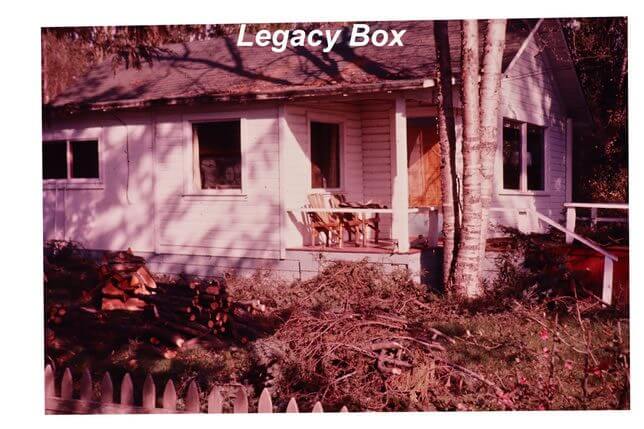
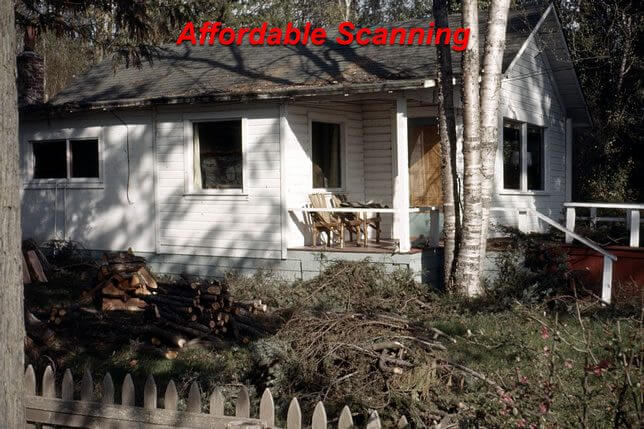
This slide shows a close-up of a house exterior — a subject with complex tones including warm brick or siding, shadows under eaves and overhangs, and often a mix of natural and reflected light. It is exactly the kind of image that benefits most from individual Photoshop correction because the balance between warm and cool tones requires a human eye to judge correctly.
Our scan (right) shows the house in balanced, natural tones with shadow areas open enough to reveal the architectural detail beneath the eaves. The Legacy Box scan (left) has the flat, slightly cool appearance typical of an automatic batch scan with no individual editing — the tones are present but underdeveloped, and the image lacks the depth and warmth that individual correction brings out.
Comparison 2: Buffalo — Legacy Box vs Affordable Scanning
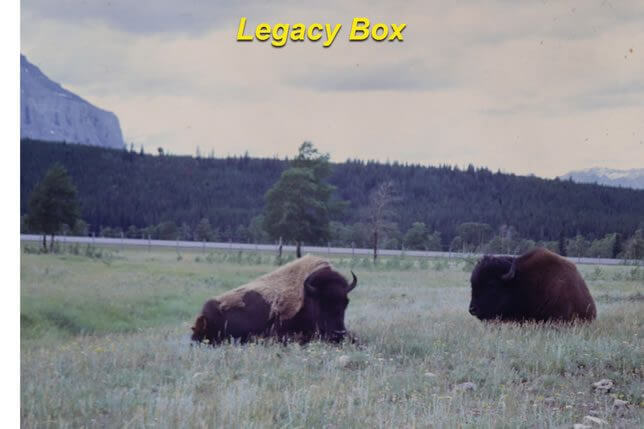
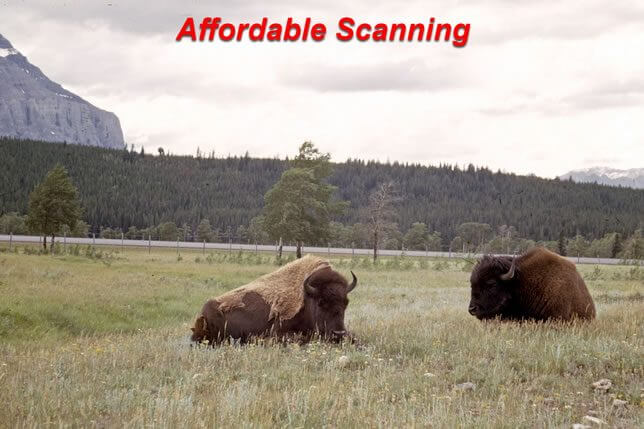
Buffalo (or bison) photographed on grassland present a specific challenge: the animal itself is a very dark subject against a much brighter background of grass and sky. Automatic scanning tends to expose for the overall scene average, which leaves the dark animal underexposed or flattens the grass and sky to compensate. Individual correction is needed to open the shadows on the animal while preserving the brightness and color of the background.
In our scan (right), the buffalo shows coat texture and individual hair detail in the darker areas, while the grass reads as genuinely green and the sky is a natural blue. The Legacy Box scan (left) shows the characteristic batch-processed look — the animal is present but the tonal range is compressed, reducing the separation between the dark subject and the lighter background.

Comparison 3: Church — Legacy Box vs Affordable Scanning
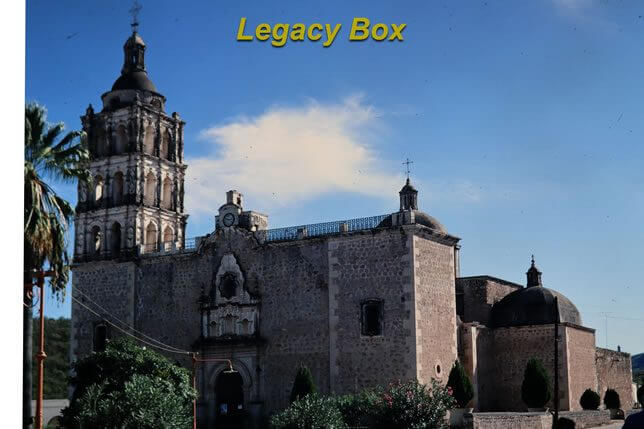
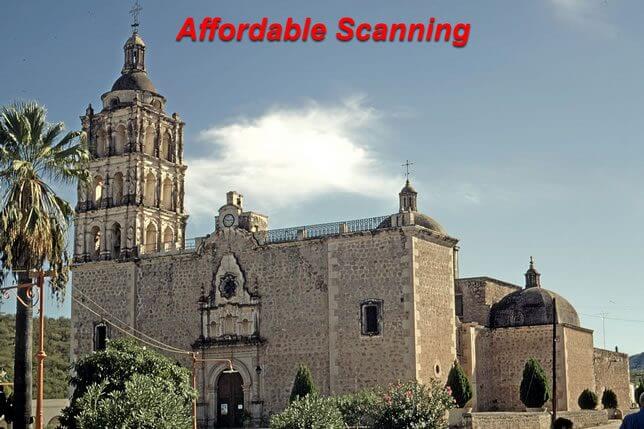
A church exterior photographed in daylight contains a wide brightness range: bright white or light-colored stone or painted surfaces in direct sunlight, deep shadows in doorways and under architectural features, and often a blue sky background. The automatic scanner has to make a single exposure decision that covers this entire range, and without individual correction the result is almost always either blown-out highlights or crushed shadows.
Our scan (right) shows the church with clean, bright white or light stone on the sunlit faces while maintaining readable shadow detail in the doorways and recessed features. The sky reads as a natural blue. The Legacy Box scan (left) has a muted, slightly gray quality typical of a batch scan calibrated to avoid blowing highlights — the image is technically safe but lacks the brightness and contrast that makes the church look as it appeared on a clear day.

Comparisons 4, 5 & 6: House with Fences — All Three Services vs Affordable Scanning
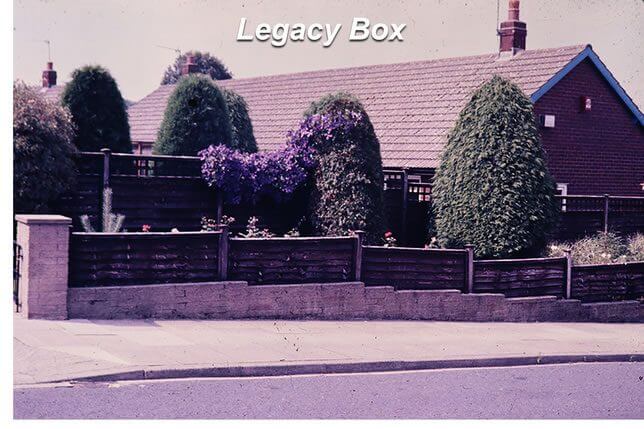
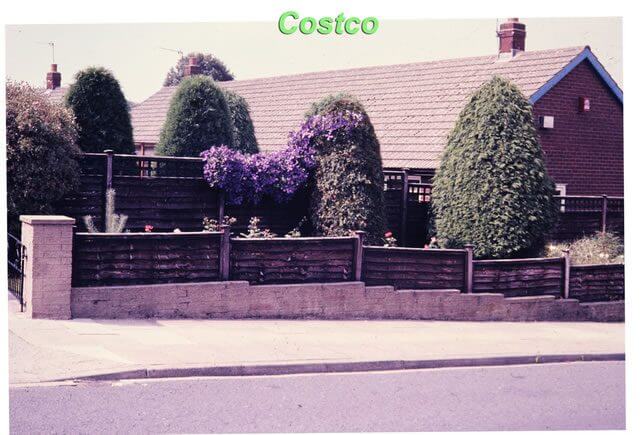
This is the most revealing set on this page because it shows the same slide returned from all three major mail-in scanning services — Legacy Box, Costco Photo, and Walgreens — and compares each one directly against our corrected scan. The subject is a house with white fences, which makes color cast immediately obvious: white fences should look white, so any color shift shows up clearly.
All three competitor scans share a persistent purple-magenta color cast that shifts the white fences away from neutral and gives the entire scene an unnatural cool-purple tint. This is not a coincidence — it is the result of all three services using similar automated batch scanning approaches that do not include individual color correction. The purple cast is a known artifact of uncorrected slide scanning where the scanner applies a default color profile rather than evaluating each slide individually.
Our corrected scan shows white fences that actually look white, a house in natural warm tones, and green foliage that reads as green rather than gray-green. This is what individual Photoshop correction achieves on every single scan we deliver.
Legacy Box vs Affordable Scanning

Costco Photo vs Affordable Scanning
Costco Photo Center scanning used the same automated batch approach as Legacy Box. The purple cast is essentially identical, confirming this is a systematic issue with uncorrected scanning rather than a one-off error.
Walgreens vs Affordable Scanning
Walgreens scanning shows the same purple-magenta cast. Three different companies, three identical color failures on the same slide. This is what happens when scanning is treated as a commodity service rather than a craft requiring individual attention to every image.

Legacybox™ is a trademark owned by AMB Media. We are not affiliated with this company. This page provides independent consumer information about scanning quality.